
Configuration
Version requirements
This page describes Shopware 6.7.14.0 and later, where the MCP server is always enabled and progressive tool discovery is active.
On Shopware 6.7.11.0 to 6.7.13.x, the MCP server is gated behind the MCP_SERVER feature flag. Set MCP_SERVER=1 in your .env file to enable the endpoint. Those versions advertise every allowed tool in tools/list; the discovery tools, tool groups, toolsets, cursor pagination, and listChanged notifications do not exist there.
Starting with 6.7.14.0, the flag is removed and has no effect. Remove MCP_SERVER from your .env file. The MCP classes stay marked as experimental until 6.8.0.
Starting with 6.7.15.0, Shopware runs on symfony/mcp-bundle 0.13. This changes the list page size setting, the session store configuration, the debug:mcp command, and some internal service IDs. See Upgrading to 6.7.15.0.
Starting with 6.7.16.0, an unset MCP allowlist grants nothing instead of everything. See Per-principal allowlist.
Shopware MCP configuration
Shopware-specific MCP settings live under the shopware.mcp key in config/packages/shopware.yaml or any config file loaded in your application:
shopware:
    mcp:
        allowed_tools: []       # Empty = all tools allowed. List tool names to restrict globally.
        app_tool_timeout: 10    # Timeout in seconds for app webhook tool calls.
These two keys are the complete shopware.mcp configuration:
| Key | Type | Default | Description |
|---|---|---|---|
allowed_tools | list of strings | [] | Installation-wide tool allowlist applied at compile time. Empty = all. |
app_tool_timeout | integer | 10 | Timeout in seconds for app webhook tool calls. Minimum 1. |
The servers, their instructions, and their session stores are configured on the symfony/mcp-bundle extension, not under shopware.mcp. The list page size is the shopware.mcp.pagination_limit container parameter, see Capability list pagination.
Global tool allowlist
allowed_tools is an installation-wide safety switch. It restricts which tools are available across all integrations at compile time:
shopware:
    mcp:
        allowed_tools:
            - shopware-tool-search
            - shopware-toolsets-list
            - shopware-toolset-enable
            - shopware-entity-schema
            - shopware-entity-search
            - shopware-system-config-read
An empty list (the default) means no compile-time restriction; all registered tools are available. When the list is not empty, add the three discovery tools and every domain tool that should remain available globally. The domain tools in the example are only an illustrative subset; you do not need to list every registered tool unless you want all of them available.
Removing the discovery tools at compile time prevents clients from finding and enabling the remaining tools. The per-integration and per-user allowlists in the Administration are the primary controls for day-to-day access management.
Per-principal allowlist
Shopware applies a per-principal MCP allowlist depending on how the client authenticates:
| Auth mode | Allowlist source |
|---|---|
Integration access key (SWIA...) | Per-integration allowlist under Settings → Integrations → Edit MCP Allowlist |
User access key (SWUA...) | Per-user allowlist under Settings → Users & Permissions → [user] → MCP tool allowlist |
| Bearer JWT, password / refresh grant | Per-user allowlist of the authenticated user |
| Bearer JWT, authorization code (PKCE) | Per-user allowlist of the user who approved the request |
| Bearer JWT, client_credentials | Per-integration allowlist |
Integration + sw-app-user-id (Copilot) | Intersection of the integration allowlist and the user allowlist |
The allowlist is stored per capability type (tools, resources, prompts). A JSON array restricts access to the listed names, and an empty array [] denies access to that capability type. What an unset value means depends on the Shopware version:
| Stored value | 6.7.16.0 and later | Before 6.7.16.0 |
|---|---|---|
Column unset (NULL) | Nothing allowed | Everything allowed |
Type key missing or null, such as "prompts": null | Nothing allowed for that type | Everything allowed for that type |
| Array of names | Only those names | Only those names |
[] | Nothing allowed | Nothing allowed |
Starting with 6.7.16.0, there is no stored value that means "everything" for an integration or a non-admin user. A principal that Shopware cannot resolve, such as an unknown access key or an inactive user, is blocked as well. In the Administration, the All switch of an integration or non-admin user saves the list of capabilities that exist at that moment. Capabilities that a plugin or app adds later must be selected explicitly.
The three server-owned discovery tools are the exception for tool allowlists. They remain available so that clients can use the discovery flow, but their search results and toolsets contain only tools permitted by the effective allowlist. A principal without any selection therefore sees the three discovery tools, and they return nothing.
Admin user accounts (admin = true) always bypass the allowlist regardless of auth mode. This applies to user accounts, not to integrations created with --admin (which bypasses ACL but still respects the per-integration allowlist).
Upgrading to 6.7.16.0
Existing integrations and non-admin users without an allowlist lose MCP access after the update. They still authenticate, but tools/list returns only the discovery tools, and calling a domain tool fails with Tool "<name>" is not enabled in your MCP allowlist. Before updating, write down which capabilities each integration uses. Afterwards, select them under Settings → Integrations → Edit MCP Allowlist or on the user detail page, or send them to the API:
POST /api/_action/integration/{integrationId}/mcp-allowlist
POST /api/_action/user/{userId}/mcp-allowlist{
"allowlist": {
"tools": ["shopware-entity-search", "shopware-entity-schema"],
"resources": ["shopware://entities"],
"prompts": []
}
}An allowlist stored as {"tools": [...], "resources": null, "prompts": null} keeps its tools and loses all resources and prompts. If you used the per-type All switch before, save the allowlist again.
Both routes now also require the matching entity privilege, user:update or integration:update, and answer 403 without it. The users_and_permissions.editor role already grants user:update. A custom role that only has the action privilege must be extended.
Delegated user calls (sw-app-user-id)
Apps that act on behalf of a logged-in user (for example, a Copilot sidebar embedded in the Admin UI) can pass the sw-app-user-id header alongside integration credentials:
sw-access-key: SWIA...
sw-secret-access-key: ...
sw-app-user-id: <user-uuid>
The value must be the Shopware user ID (a UUID in hex format, e.g., 01932f3a...). Apps embedded in the Admin UI can read it from:
- The current session in JavaScript:
Shopware.Store.get('session').currentUser.id - The Admin API:
GET /api/_info/me— thedata.idfield in the response
If the header is absent or invalid (i.e., not a valid UUID), Shopware ignores it and applies only the integration allowlist.
When this header is present, and a valid user UUID is provided, Shopware applies the intersection of the integration allowlist and the user allowlist. A tool is only available if both the integration and the user have it enabled:
| Integration allowlist | User allowlist | Effective allowlist |
|---|---|---|
[tool-a, tool-b] | admin user | [tool-a, tool-b] |
[tool-a, tool-b] | [tool-b, tool-c] | [tool-b] |
[tool-a] | [] | [] (nothing) |
[tool-a, tool-b] | unset | [] since 6.7.16.0, [tool-a, tool-b] before |
| unset | [tool-b] | [] since 6.7.16.0, [tool-b] before |
Admin users bypass the user side of the intersection, so the integration allowlist alone applies. Integrations never bypass the allowlist. Starting with 6.7.16.0, an app that forwards sw-app-user-id therefore needs an explicit integration allowlist, and every non-admin user needs their own selection.
This pattern lets the app owner control which tools the integration may ever call, while users control which of those tools they personally allow the app to use on their behalf. Neither side can grant more than what the other has permitted.
MCP bundle configuration
Shopware ships the configuration of the underlying symfony/mcp-bundle, and Symfony loads it automatically. You do not need to create or modify it for standard setups.
Shopware has served both MCP endpoints since 6.7.11.0. Since 6.7.15.0, the configuration declares them as two servers under the bundle's servers key. Before that, Shopware registered the Store API server with its own services outside the bundle configuration. The following table lists the two servers:
| Server | Endpoint | Exposes |
|---|---|---|
admin | /api/_mcp | Core, Storefront, plugin, bundle, and app capabilities for the Admin API |
store_api | /store-api/_mcp | Capabilities tagged with shopware.store_api_mcp.* |
For both servers, the bundle's HTTP and stdio transports are switched off (transports.http: false), because Shopware's own controllers serve the endpoints.
The configuration also sets the server instructions that clients receive during initialize. They tell the agent that the advertised tool list is not the full catalogue and that it should call shopware-tool-search before concluding that an action is unsupported.
You can add settings for a server in your own config/packages/mcp.yaml. Symfony merges them with the values shipped by Shopware. Use this for the session store. Do not change transports or registry, because Shopware relies on them to apply authentication and to assign capabilities.
Capability list pagination
The tools/list, resources/list, and prompts/list methods use MCP cursor pagination. When a response contains nextCursor, pass that value unchanged as cursor in the next request. Continue until nextCursor is absent.
The default page size is 50 entries. Since Shopware 6.7.15.0, it is the shopware.mcp.pagination_limit container parameter, which applies to both servers. To change it, override the parameter:
# config/services.yaml
parameters:
    shopware.mcp.pagination_limit: 100
On 6.7.14.x, the page size is the MCP bundle's pagination_limit option instead. Configure it with mcp.pagination_limit in config/packages/mcp.yaml. The bundle removed that option in 0.13.
Treat cursors as opaque values. Shopware applies the effective allowlist before pagination, so each page contains only capabilities the current principal may access, and a cursor is only meaningful for the principal that received it. An unknown, malformed, or out-of-range cursor is answered with the JSON-RPC error -32602 and the message Invalid value for pagination parameter "cursor".
In practice tools/list rarely paginates: it only contains the discovery tools plus the tools of the toolsets enabled for the current session or requested with ?toolsets. A client that connects with ?toolsets=all and ignores nextCursor sees only the first page. resources/templates/list is not allowlist-filtered.
Session store
MCP sessions track an ongoing conversation across multiple requests. The client performs an initialize handshake first, then sends subsequent tools/call requests referencing that session ID. Session data and enabled toolsets must survive between requests.
Each MCP server has its own session store. Session IDs are not namespaced per server, so a shared store would make a session created on /api/_mcp valid on /store-api/_mcp. The bundle refuses to build the container when two servers share the same storage location.
Shopware defaults to a file-based session store per server, which writes to %kernel.cache_dir%/mcp-sessions/<server>, for example mcp-sessions/admin and mcp-sessions/store_api. Before 6.7.15.0, both endpoints wrote to %kernel.cache_dir%/mcp-sessions/. Sessions that existed before the update are not carried over, on either endpoint, so every MCP client initializes once more.
Enabled toolsets are stored separately, in the mcp_toolset_session database table, keyed on the Mcp-Session-Id header only, not per user and not per integration. Rows are deleted when the client ends the session with DELETE /api/_mcp or DELETE /store-api/_mcp. Sessions that are abandoned without a DELETE are cleaned up by the daily mcp_toolset_session.cleanup scheduled task, which checks the session stores of both servers. The scheduler must run in production.
The session options of each server select the store:
store | Multi-worker | Multi-server | Backend |
|---|---|---|---|
file (default) | No | No | session.directory, default %kernel.cache_dir%/mcp-sessions/<server> |
memory | No | No | Per-process RAM |
cache | Yes, with a shared pool | Yes, with a shared pool | The PSR-16 service in session.cache_pool. The default pool wraps cache.app |
framework (unusable in Shopware) | Yes | Yes | Requires active PHP session, not available because the Admin API is stateless |
The cache store is only as shared as its pool. Point cache_pool at a Redis-backed pool for production. The cache and framework stores prefix keys with mcp-<server>- by default, so both servers can use the same pool. Every store expires sessions after session.ttl seconds (default 3600).
Production: Redis session store
The file store works on a single machine. In a multi-server or Kubernetes environment, initialize and subsequent tool calls may land on different workers that do not share a local filesystem. Switch both servers to a Redis-backed cache store:
config/packages/mcp.yaml:
mcp:
    servers:
        admin:
            session:
                store: cache
                cache_pool: mcp.session.cache_psr16
        store_api:
            session:
                store: cache
cache_pool: mcp.session.cache_psr16config/services.yaml:
services:
    mcp.session.cache_psr16:
        class: Symfony\Component\Cache\Psr16Cache
arguments: ['@cache.mcp_sessions']config/packages/framework.yaml:
framework:
    cache:
        pools:
            cache.mcp_sessions:
                adapter: cache.adapter.redis_tag_aware
                provider: 'redis://your-redis-host:6379'
                default_lifetime: 3600
If you already have a Redis/Valkey connection configured for Shopware, set provider to the same DSN to avoid opening a second connection.
A configuration that is not picked up leaves the file store in place, and the endpoints keep working. To confirm the switch, inspect the store of each server:
bin/console debug:container mcp.server.admin.session.store --show-arguments
bin/console debug:container mcp.server.store_api.session.store --show-arguments
Both must report the class Mcp\Server\Session\Psr16SessionStore, with the prefixes mcp-admin- and mcp-store_api-. Switching the store discards the sessions that exist at that moment, so connected clients initialize again.
Active session registry
When an app with MCP capabilities is installed, updated, activated, deactivated, or deleted, Shopware sends notifications/tools/list_changed to every active session of both servers. It finds those sessions in an active session registry, which it keeps in cache.system. That cache is local to each server, so on several servers the notification only reaches sessions that were initialized on the server that processed the app change. Point both registries at the shared pool as well:
config/services.yaml:
services:
    shopware.mcp.session_registry_cache:
        class: Symfony\Component\Cache\Psr16Cache
        arguments: ['@cache.mcp_sessions']

    mcp.store_api.session_registry_cache:
        class: Symfony\Component\Cache\Psr16Cache
        arguments: ['@cache.mcp_sessions']
The two registries use different cache keys, so they can share the pool with the session stores. A registry is written without a TTL, so it expires after the pool's default_lifetime. Shopware rewrites it on every MCP request, so it outlives its sessions as long as default_lifetime is not shorter than session.ttl or is left unset. They serialize their updates with a lock from lock.factory. Configure a shared lock store when you run more than one server. These service IDs are the same on 6.7.14.x.
On 6.7.14.x, the bundle has no per-server session options. There, override the mcp.session.store service with a Mcp\Server\Session\Psr16SessionStore that receives @mcp.session.cache_psr16 and a TTL. Remove that override when you update to 6.7.15.0, because Shopware no longer uses the mcp.session.store service.
ACL and permissions
All MCP tool operations respect the integration's Admin API ACL role. To restrict what an MCP client can do:
- Create an ACL role in Settings → Users & Permissions → Roles with only the required permissions.
- Assign that role to the integration (omit
--adminwhen creating via CLI). - Under Settings → Integrations → Edit MCP Allowlist, enable only the tools needed for this integration.
The Admin UI surfaces two helpers for getting ACL right:
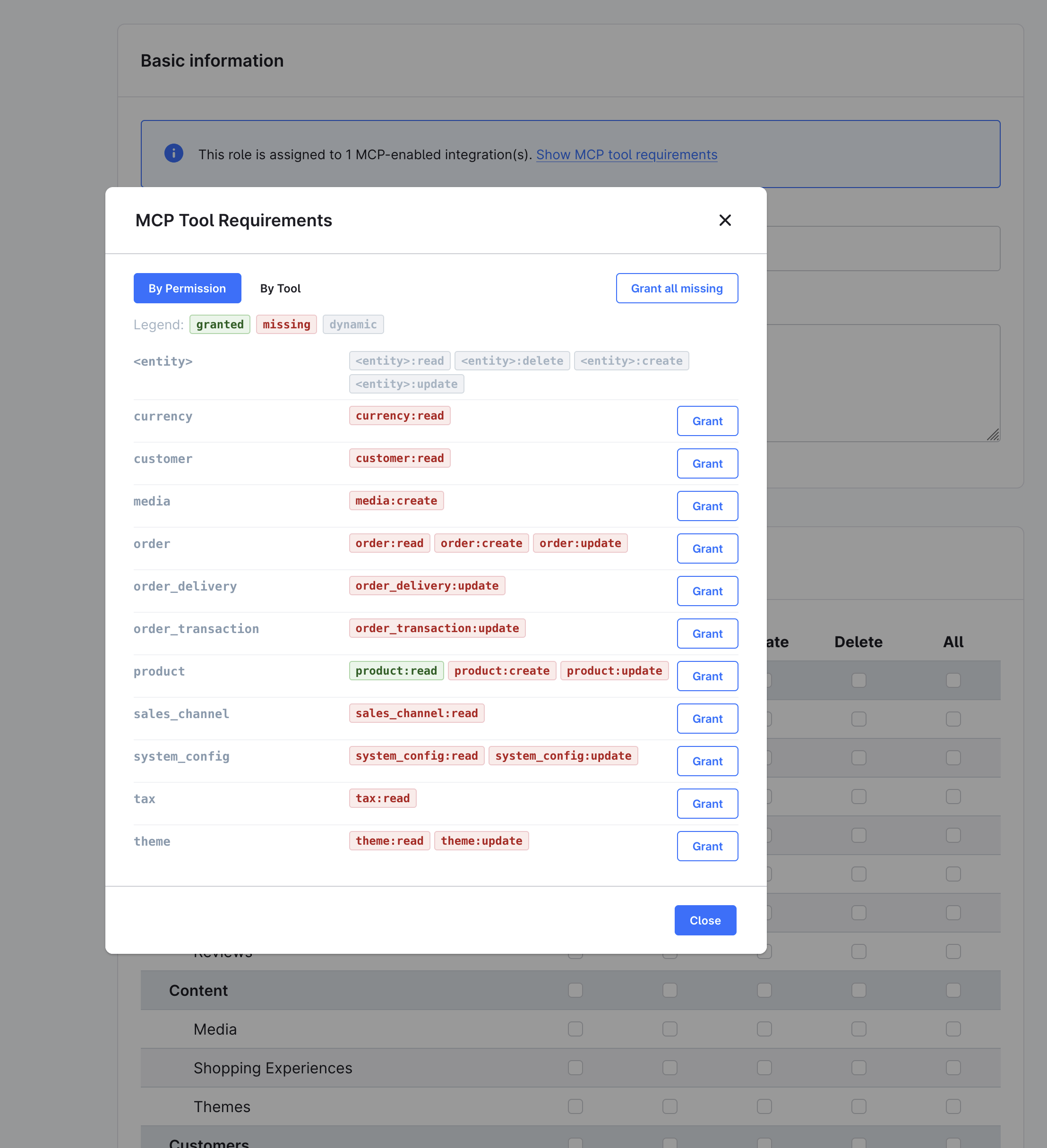
- The Role detail page shows a banner when the role is assigned to MCP-enabled integrations. Click Show MCP tool requirements to open the MCP Tool Requirements modal, which lists every privilege required by the allowed tools. Switch between By Permission (per-entity view with Grant buttons) and By Tool (per-tool view). Use Grant all missing to add the missing privileges in one click:
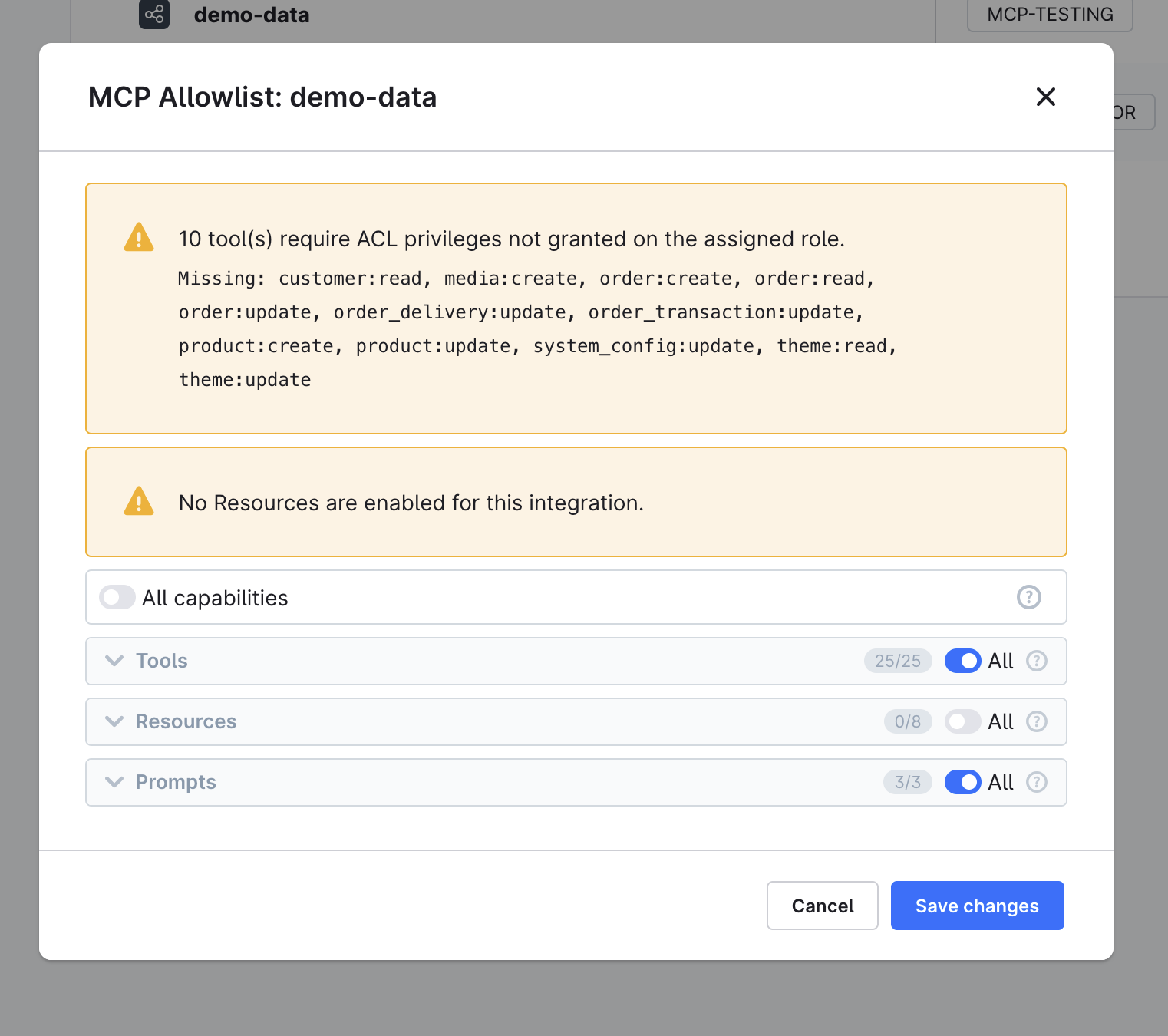
- The Edit MCP Allowlist modal groups tools by their tool group — the same taxonomy that becomes a toolset for progressive discovery. Each group has its own checkbox that also reflects partial selections, plus expand and collapse controls, so you can allow a whole toolset in one click. A tool that another selected tool declares as a dependency is included automatically and marked as such. The modal also shows a coverage warning when the assigned role is missing privileges required by an allowed tool:
CLI: debug:mcp
List all registered tools of both servers:
bin/console debug:mcpThe tool output shows five columns: Name, Group, Source, Dependencies, and Privileges. It reads from the complete live server registry and covers core and extension tools in one view. The Group becomes the toolset name used for progressive discovery.
The command prints one section per server. Limit the output to one server with --scope:
bin/console debug:mcp --scope=api        # /api/_mcp only
bin/console debug:mcp --scope=store-api  # /store-api/_mcp only
Since Shopware 6.7.15.0, debug:mcp lists tools only. symfony/mcp-bundle ships its own debug:mcp command, which Shopware renames to debug:mcp:native. Use it for prompts, resources, resource templates, and the configured servers:
bin/console debug:mcp --native # same as bin/console debug:mcp:nativeThe --tools option is still accepted but has no effect. The --prompts and --resources options were removed in 6.7.15.0.
If a capability carries an MCP attribute but no server exposes it, debug:mcp prints a warning below the tool list. Such a capability is unreachable on both endpoints.
Drill into a single capability by name:
bin/console debug:mcp shopware-entity-searchSee the registry from a specific integration's perspective (honors its per-integration allowlist):
bin/console debug:mcp --integration=SWIA...The integration filter applies to the Admin API server only. Store API tools are listed unfiltered.
If a tool is missing from this output, it is also missing from the live endpoint. Common causes:
- Plugin is not installed or activated
- Service tag is missing (
shopware.mcp.tool) #[McpTool]attribute is on__invoke()instead of the class- App tool's webhook URL is not reachable
Rate limiting
Both MCP endpoints are rate limited with their own buckets, configured under shopware.api.rate_limiter in config/packages/shopware.yaml. Rate limiting protects the endpoints from brute-force attempts and runaway agent loops.
| Bucket | Endpoint | Keyed on | Limits |
|---|---|---|---|
mcp_admin_api | /api/_mcp | Access token, falling back to client IP | 300 per minute, 1000 per 10 minutes |
mcp_store_api | /store-api/_mcp | Sales channel and context token, plus client IP | 120 per minute, 600 per 10 minutes |
Both use the time_backoff policy and reset after one hour. Exceeding a limit returns HTTP 429 with the remaining wait time in the response body; no Retry-After header is sent.
Upgrading to 6.7.15.0
Shopware 6.7.15.0 updates symfony/mcp-bundle to 0.13 and mcp/sdk to 0.8. Plugins and apps that register tools, prompts, or resources through the shopware.mcp.* or shopware.store_api_mcp.* tags or through Resources/mcp.xml need no changes.
Code that integrates with the MCP internals must be updated. These classes and services are marked @experimental stableVersion:v6.8.0.
The bundle registers one set of services per server, so the flat service IDs were renamed:
| Before | After |
|---|---|
mcp.server | mcp.server.admin |
mcp.server.builder | mcp.server.admin.builder |
mcp.registry | mcp.server.admin.registry |
mcp.store_api.server | mcp.server.store_api |
mcp.store_api.server.builder | mcp.server.store_api.builder |
mcp.store_api.registry | mcp.server.store_api.registry |
mcp.session.store | mcp.server.admin.session.store and mcp.server.store_api.session.store (shared before) |
The StoreApiMcpServerBuilderCompilerPass was removed.
Protocol request and notification handlers are scoped per server:
| Target server | Request handler tag | Notification handler tag |
|---|---|---|
| Admin API | mcp.admin.request_handler | mcp.admin.notification_handler |
| Store API | mcp.store_api.request_handler | mcp.store_api.notification_handler |
A handler that only carries the bundle's global mcp.request_handler or mcp.notification_handler tag reaches neither server.
Further changes:
- The
discovery.scan_dirsoption was removed. Capabilities are registered from their service tag at compile time. Each server lists the namespace prefixes it exposes undermcp.servers.<name>.registry, and Shopware assigns plugin and third-party bundle capabilities automatically. - The bundle's
mcp.pagination_limitoption was removed. Use theshopware.mcp.pagination_limitparameter, see Capability list pagination. - Each server has its own session store. A custom
mcp.session.storeservice is no longer used, see Session store. debug:mcplists tools only. Usedebug:mcp --nativefor prompts and resources.- Both endpoints keep serving the protocol revisions they served before, so the negotiated
protocolVersionand theMcp-Session-Idbehavior are unchanged.
For the reasoning behind these changes, see the ADR MCP capability registration via the container.
